
Sorting files into folders manually is not the most comfortable option available, especially if you need to create multiple folders to move different files into them. I have reviewed a few programs in the past that automate that process, from I like To Move It which allows you to movefiles and folders based on rules set in the program’s ini file, to Dir Utils which has options to sort files based on their extension.
Files 2 Folder is a portable program by Donation Coder’s busiest member Skwire. The program registers a new shell entry when launched which can be used to automatically move the selected files into a new folder. Windows Vista and Windows 7 users need to run the program with administrative privileges to register the shell extension correctly. If they do not, the entry is not displayed in the context menu.
Just select one or multiple files in Windows Explorer, right-click the selection afterwards and select the Files 2 Folder option from the context menu.
The software creates a folder based on the filename if a single file is selected, and displays a popup otherwise.
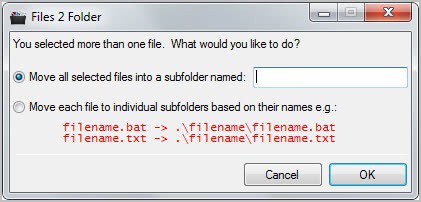
Here you can then select to move all files into a single directory that you have to name, or to move each file into an individual folder based on individual file names.
Files 2 Folders simplifies the process of moving files into new folders on the system. This can be a useful program for users who often download all kind of files into a single download folder to move them from that folder at a later time.
A file to uninstall the shell extension is placed into the program folder after registration of the extension. This can be used to remove the entry again from Windows Explorer’s context menu.
Windows users can download the program from Skwire’s website.


Post a Comment
Note: Only a member of this blog may post a comment.